


Showing posts with label Secure Computing. Show all posts
Showing posts with label Secure Computing. Show all posts
Self-extracting archive (SFX) as Creative Virus Handler

Yesterday I Found and interesting article about "Self-extracting archive (SFX)" on Unremote.org by DarkCoderSc. SFX is a little application that contains compressed files. Creating a customized WinRAR SFX archives is a very easy task, but not all people know how to do it. It is therefore exactly the sa
How to make CD(compact disk) password protected
Sometime we need to protect our data from unauthorized access.KernSafe SecureCD Creator is an advanced and powerful, full-featured CD encryption software. Create, edit
New UK Cyber Security Strategy Released

The UK's intelligence agency GCHQ will become a main port of call for businesses dealing with cyberattacks, under the government's new cybersecurity strategy revealed on Friday. The Cheltenham-based GCHQ agency will receive huge amount of fund for its larger contribution to UK's cyber-defence, as announced by Cabinet Office minister Francis Maude in the The UK Cyber Security Strategy [PDF].
The government's eavesdropping centre GCHQ will be offered to private industry to help companies improve their security measures against cyber threats.However, the biggest focus will come in trying to educate and help the public to protect themselves from scams, viruses, criminal attacks and more threats.
"To support the implementation of our objectives we have committed new funding of £650m over four years for a transformative National Cyber Security Programme (NCSP) to strengthen the UK’s cyber capabilities," wrote the Minister for the Cabinet Office Francis Maude, but added that the Government will need the help of the private sector as well. The aim of government is to convert UK into one of the safest places to conduct business along with tackling cyber crime and also cyber-espionage as a whole.
The document, the release of which has been delayed twice, replaces a two-year-old strategy and allocates £650m in funding to set up a National Cyber Security Programme. Of the £650m in funding, around 65 percent is expected to be spent on capabilities, 20 percent on critical cyber-infrastructure, nine percent on cybercrime specifics, five percent on reserves and one percent on education.
The Get Safe Online website will be revamped to raise public awareness, while a new "kitemarking" system will be imposed on cyber security software to help customers avoid "scareware", software that claims to be helpful but is actually malicious.Get Safe Online advises consumers to install anti-virus and anti-spyware software, and always ensure that it is kept updated, as well as impose security on their wireless network.The site further urges people to use strong passwords for protected websites, avoid offering personal information on blogs or social networks and never open email attachments from unknown sources.
[Source and Read More]Your Android Phone is Spying On You, Use custom ROM To Protect your Privacy

In this digital age, privacy is more important than ever. Just because you “don’t have anything to hide,” does not mean that you shouldn’t value your privacy or fight for it when companies do things like this, especially with something as personal as your cell phone.
An Android developer recently discovered a clandestine application called Carrier IQ built into most smartphones that doesn't just track your location; it secretly records your keystrokes, and there's nothing you can do about it. Is it time to put on a tinfoil hat? That depends on how you feel about privacy. In the nearly 20-minute video clip, Eckhart shows how software developed by mobile-device tracker Carrier IQ logs each keystroke and then sends them off to locations unknown. In addition, when Eckhart tried placing a call, Carrier IQ's software recorded each number before the call was even made.
What is Carrier IQ, exactly?
The software is hidden inside phones there is little you can do to detect that it’s even installed, let alone remove it, and it tracks everything. Keystrokes, browsing and surfing habits, Google searches, and basically every single thing that you are doing on your phone and every button that you press is logged by this software. Jump to 9:00 in the YouTube video below for the proof this is basically a keylogger running on your phone that you didn’t know about.

The company that’s creating this software claims that the point of the software is to deliver “analytics” about devices to the carriers to help them provide better service to their users. But is recording every keystroke really necessary for that information? Does not telling the users about this and making it near-impossible to opt out seem a bit fishy to anybody else? This software is on almost all Android phones made by the big names (HTC, Samsung, Motorola), and is even on BlackBerries and Nokia devices, as well.
"Our action was misguided and we are deeply sorry for any concern or trouble that our letter may have caused Mr. Eckhart," the company said in response to the EFF's letter. "We sincerely appreciate and respect EFF's work on his behalf, and share their commitment to protecting free speech in a rapidly changing technological world."
But Eckhart's new video seems to refute at least some of those claims. In one part of the clip, he shows how an entire SMS message--"hello world"--was recorded by Carrier IQ's software. In another example, he demonstrates how a Google search, his location, and other key information is recorded by Carrier IQ's application, even though he was on Wi-Fi and a page secured by HTTPS.
HTTPS? Nothing Is Safe From Carrier IQ
For those unaware, the S in HTTPS stands for secure. It's what keep your passwords and other sensitive data safe when sent across the web. It's provides encryption for said information, so whilst it's traveling through the airwaves, it's safe and snuggly, away from the awful people who want to steal your info.
Just because a website is using a secure connection doesn't mean it's one-hundred percent safe from end-to-end, though. You see, some information, including usernames and passwords, can still be sent plain text. For example, the username and password can be used in the address of the site, like www.mysite.com?username=MYNAME&password=MYPASS (Trev's example). Sure, it's encrypted while going down the tunnel, but guess who gets to see the raw link? Did you guess Carrier IQ? If so, go get yourself a cookie. You earned it. [Source]
Carrier IQ says in this public statement that it is “not logging keystrokes or providing tracking tools” and that its software is used to track performance, but the video proves entirely otherwise: this app is sitting in between you and the Android OS and is making a note of everything you do. Secure websites don’t help. Even using Wi-Fi doesn’t help. Your phone use is being logged by this software, and there is no way to easily opt out.
Devices Without a Cellular Network Aren't Safe, Either
Let's think about the name of this thing for a minute - Carrier IQ. So, it's probably safe to say that this is all about the carriers, right? If that were true, then why would CIQ remain active once a device no longer has carrier service?
Let me back up for one second, CIQ claims that its services are stopped the second the SIM card is removed from the device, which is all fine and dandy... if you're on a GSM network. Those of us on CDMA networks aren't so lucky, though, because we don't use SIM cards. Thus, even when a device is deactivated from its network, it continues to send data back to the carrier, CIQ, and whoever else whenever you're on a Wi-Fi connection.
Ensure your Privacy : Use custom ROM To Protect your Privacy
Unfortunately, there is no easy way to protect yourself. There’s no switch that you can turn off in the settings of your phone or software that appears in your app drawer that you can simply uninstall. As far as the GUI of your phone is concerned, Carrier IQ isn’t even there. But it is there, hiding in the background, making sure that you don’t even know it exists. And for many, that’s just not cool. Your phone is a deeply personal device and contains lots of things (emails, photos, text messages) that many would consider totally private. Why should this company have access?

Best way, root your phone and there are many guides available for the different devices. The best place to look for information on rooting is the XDA Forum. Search on the page for your phone name and go to the “General” forum for the device. There, you should find threads with guides on how to root and get the phone ready to install custom ROMs. The process varies widely phone by phone, so we can’t give you a definitive guide here, but XDA is generally on top of the best rooting processes for the major devices.The next step is to find a ROM that supports your device that does not have Carrier IQ installed on it. Your best bet is to look for “AOSP” or “Vanilla” ROMs. These are versions of Android that have built entirely from the open source code for Android that’s released by Google each time a new version comes out. These ROMs will be free from carrier and device manufacturer tinkering, and won’t have Carrier IQ hiding in the background.
Another great custom ROM solution is Cyanogenmod. Cyanogenmod has some nice additional tweaks and features above stock Android, and is definitely the most well respected and most frequently updated custom ROM out there. Additionally, it’s available on most popular Android devices out there. The developers are even working hard on the next version, based on Android 4.0, Ice Cream Sandwich.
A simple Guide : How To Install CyanogenMod 7 On Samsung Galaxy S II Using ROM Manager is Available here.
HOW TO: Protect Your Company’s Passwords

It’s almost impossible to understate the importance of having and using strong, secure online passwords. As important as it is for consumers to heed this advice, it can be even more important for businesses to use and
Are Proxy Sites Safe
Apart from actually doing just school stuff at school, you could try proxy websites (which act like a middleman between you and other websites).
Apparently, Cyberoam's safelists aren't perfect and they do allow access to certain proxy sites. Note however that there is a (huge) security risk involved: all your personal and authentication information passes through the proxy, even when using HTTPS. Just don't go to bank or creditcard websites ;) Or PayPal, for that matter.
According to some video on Metacafe, ninjaproxy.com is generally not blocked by Cyberoam
Apparently, Cyberoam's safelists aren't perfect and they do allow access to certain proxy sites. Note however that there is a (huge) security risk involved: all your personal and authentication information passes through the proxy, even when using HTTPS. Just don't go to bank or creditcard websites ;) Or PayPal, for that matter.
According to some video on Metacafe, ninjaproxy.com is generally not blocked by Cyberoam
HOW TO DETECT KEYLOGGER ON YOUR SYSTEM AND UNINSTALL THEM

Hi folks...
key loggers are software that traces the key strokes on your computer. It is done in such a way that a person using the computer is unaware of the fact that a key logger is installed on a particular PC.
How does keyloggers enters your computer ?
There are several ways in which a key logger can get into your computer either it is directly installed or it is indirectly transferred to your computer. Most of the time, this malicious file enters a computer when the user downloads an infected application like movies, music or other software applications.
So how to get rid of keyloggers that is installed on a computer
1. Use updated antivirus and anti spyware
Some of the good anti viruses have capability to detect key loggers. So you should update your antiviruses regularly so that it gets updated for new keyloggers.
2. Use Anti keyloggers
There are anti keyloggers available that will make the task easy for you in finding a keyloggers. Use these softwares if you think there is a high possibility of keyloggers on a computer. The anti keyloggers that i will suggest you is Cyberhawk. Even Kasperky does a good job in this area too. Also check anti-spy.info. More examples:
- http://www.microsoft.com/athome/security/spyware/software/default.mspx
- http://www.lavasoftusa.com/software/adaware/
- http://security.kolla.de/
- http://www.clamwin.com
3. Search for keyloggers yourself
Keyloggers have the capability that they hide them self from the user but are active in the background. There are some shortcuts that are used to see them live on screen
For example : Ctrl + Alt + X or Ctrl + Alt + Wondows Key + X or desktopshark etc.
4. Uninstalling tools
KL-Detector
Freeware on demand keylogger scanner.
Freeware on demand keylogger scanner.
SnoopFree
Freeware antikeylogger that block hook based keyloggers as well as screen captures. For Windows XP.
Freeware antikeylogger that block hook based keyloggers as well as screen captures. For Windows XP.
PSMAntiKeyLogger
PSMAntiKeyLogger is a real-time protecting software which protects you against Keyloggers. No scanning is needed.
PSMAntiKeyLogger is a real-time protecting software which protects you against Keyloggers. No scanning is needed.
Hope you like the efforts.
Enjoy and don't forget to comment.
How to bypass/hack a Firewall

Firewall is often called Hindrance(Obstacle) by hackers. In the below chart ,the complete working of firewall is shown :
The method which is mostly used by Hackers to bypass firewall is known as SSH tunneling.
What is SSH Tunneling?
- Well according to wikipedia:
A Secure Shell (SSH) tunnel consists of an encrypted tunnel created through an SSH protocol connection. Users may set up SSH tunnels to tunnel unencrypted traffic over a network through an encrypted channel.
For more information on SSH Tunneling See it on Wikipedia Here
Reason to Bypass firewall
Firewall is always a problem for Hackers.Particularly if you are in university or working somewhere,you have examined that the network administrators deny access to file sharing, instant messaging or social networks such as facebook or myspace with a firewall or proxy server.So when ever you want to connect to them a message comes that these services are unavailable or something like that.To avoid this ,we have to break firewall so that we may access these services.SSH Tunneling
 Now we will see How to Hack or Bypass firewall using SSH Tunneling
- First of all Create an account for SSH access.There are many sites which provide paid and free SSH access.One of them is Superprotocol .
- Now download an open source SSH Client named Putty .
- After downloading ,execute the software and run it.
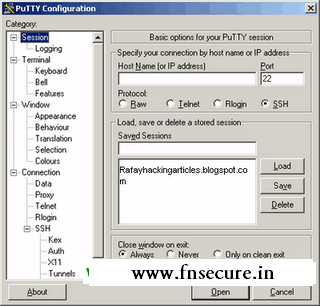
- Now you will come to this configuration settings page.
- Now in the host name,enter the server through which we can connect SSH access.make sure SSH is selected using port 22.
- Next, in the SSH options,click on Tunnels,here we will set up a Tunnel.
- Change the Source port to 8080 and then click on Dynamic.
- After doing all this click on Open.
- Now login in with username and password which we given in SSH Provider.
- Establishing the tunnel part is completed now.
Wire Shark Instalation

- Now we need to Download another software named Wire Shark and execute wireshark.
- Now start Packet capture,in the beginning it will be empty.
- Open google.com in your browser and then packets getting captured by the software.
Configuring Mozilla

- Open the Mozilla browser and open "Tools" menu and then "Options".
- Click on "Advanced" button tab, and then "Network" tab, and then click on "Settings".

- Now you are in Connection Settings enter "localhost" as the "Socks Host and port number, such as "1080" into the "Port:" field.
- Now come back to wire shark you will see some SSH connection but now there's no information about what is being sent from server to client.
Save this Page
