


Showing posts with label System security. Show all posts
Showing posts with label System security. Show all posts
Self-extracting archive (SFX) as Creative Virus Handler

Yesterday I Found and interesting article about "Self-extracting archive (SFX)" on Unremote.org by DarkCoderSc. SFX is a little application that contains compressed files. Creating a customized WinRAR SFX archives is a very easy task, but not all people know how to do it. It is therefore exactly the sa
How to make CD(compact disk) password protected
Sometime we need to protect our data from unauthorized access.KernSafe SecureCD Creator is an advanced and powerful, full-featured CD encryption software. Create, edit
Linux: 25 PHP Security Best Practices For Sys Admins
PHP is an open-source server-side scripting language and it is a widely used. The Apache web server provides access to files and content via the HTTP OR HTTPS
How to fool a Keylogger

These days Agents spy on u everywhere, in college, at work, maybe a trojan virus on your home PC which keylogs your paswords and mails it to someone else. If u think u r being logged, try this: Whenever u have to type a password, never type the complete password in one go, ie, if your
10 Fast and Free Security Enhancements

Before you spend a dime on security, there are many precautions you can take that will protect you against the most common threats.
1. Check Windows Update and Office Update regularly
Blocking Ultrasurf with a Sonicwall Application Firewall
Organizations under pressure to keep students and employees from bypassing internet filters using client technologies, like UltraSurf are in a perpetual game of cat and mouse. A network admin I know used these steps to block it on his Sonicwall:
Ultrasurf uses “140300000101″ for SSL ehlo messages. If you can block this signature with the your firewall you can block ultrasurf. To do this follow these steps:
- Create a custom object in Firewall/Application Object section. Lets say the name of the object is “Ultra”
- Application object type must be “Custom object”
- Match Type must be “Exact Match”
- Input Representation must be “Hexadecimal”
- Then add Content “140300000101″
- Policy name: write whatever you want
- Policy type “Custom Policy”
- Adress Source “Any”, Destionation “Any”
- Service Source “Any”, Destionation “Any”
- Exclusion Adrsss “None”
- Application Object “Ultra Object” **Select the object which you write in the first section
- Action “Reset/Drop”
- Users/Group Included “All”, Excluded “None”
- Schedule “Always On”
- Enable loging “Check”
- Redundancy Filters “Use Global settings checked”.
- Connection Side “Client Side”.
- Direction “Basic” Both
Dont forget to enable the Application Firewall feature. This is a bit easier to do on a Palo Alto firewall since the application is already identified natively by the box, you just have to block it in one of your threat profile policies.
"No more Orkuting,no more facebook sorry to students
Trace An Email weather its real or fake
Generally, the path taken by an email while traveling from sender to receiver can be explained by following diagram.
So here is the method of tracing the exact location from the email sent.I am showing the email tracing on yahoo here but gmail and other mail providing services have same concept.
Step 1:-First open up your email account and click on your inbox.
Step 2:-Now Select any email that you want to trace
Step 3:-After Opening scrool the mail at the end and in right corner you will see a option FULL HEADER click on it
Step 4:- Now Closely Look at the the header you will find the whole detail that from which IP address it is sent.
Have a close eye on these contents
1. Received From: - 127.0.0.1(EHLO mail-qy-f200.google.com) (209.85.221.200)
The IP address at last is the real IP address of the person who is sending this mail.
2. To see the proper location of this IP address Go to www.whatismyip.com or www.whois.domaintools.com .These websites help you to find the whole detail and satellite images of the ISP location from the Email was sent.
Vickys' Suggestion:- "After finding the IP address of the sender I recommend to use www.whois.domaintools.com to get satellite image of the location from the mail is received."
5 TIPS TO SECURE WIFI NETWROK

1. Install a Firewall A firewall helps protect your PC by preventing unauthorized users from gaining access to your computer through the Internet or a network. It acts as a barrier that checks any information coming from the Internet or a network, and then either blocks the information or allows it to pass through to your computer.
2. Change the Administrative Password on your Wireless Routers Each manufacturer ships their wireless routers with a default password for easy initial access. These passwords are easy to find on vendor support sites, and should therefore be changed immediately.
3. Change the Default SSID Name and Turn Off SSID Broadcasting This will require your wireless client computers to manually enter the name of your SSID (Service Set Identifier) before they can connect to your network, greatly minimizing the damage from the casual user whose laptop is configured to connect to any available SSID broadcast it finds. You should also change the SSID name from the factory default, since these are just as well-known as the default passwords. NOTE: Even though the SSID is disabled the SSID is included in the data packets that are transmitted and is easy to discover.
4. Disable DHCP For a SOHO network with only a few computers, consider disabling DHCP (Dynamic Host Configuration Protocol) on your router and assigning IP addresses to your client computers manually. On newer wireless routers, you can even restrict access to the router to specific MAC addresses.
5. Replace WEP with WPA WEP (Wired Equivalent Privacy) is a security protocol that was designed to provide a wireless computer network with a level of security and privacy comparable to what is usually expected of a wired computer network. WEP seeks to establish security by encrypting data transmitted over the wireless computer network. Data encryption protects the vulnerable wireless link between clients and access points. Once this measure has been taken, other typical wire computer network security mechanisms such as password protection, end-to-end encryption, virtual private networks (VPN's), and authentication can be put in place to ensure privacy. Unfortunately, WEP is a very weak form of security that uses common 60 or 108 bit key shared among all of the devices on the network to encrypt the wireless data. Hackers can access tools freely available on the Internet that can crack a WEP key in as little as 15 minutes. Once the WEP key is cracked, the network traffic instantly turns into clear text – making it easy for the hacker to treat the network like any open network. WPA (Wi-Fi Protected Access) is a powerful, standards-based, interoperable security technology for wireless computer networks. It provides strong data protection by using 128-bit encryption keys and dynamic session keys to ensure a wireless computer network's privacy and security. Many cryptographers are confident that WPA addresses all the known attacks on WEP. It also adds strong user authentication, which was absent in WEP.
How to intrude in the PC which is shut downed at Cyber cafe.
(Don’t Forget to read our disclaimer at the bottom of the post.)
1. As you all must have know these days all Cyber cafe owners have a program for administration to control all PC’s in local area network. So all files can be inter transmitted.
2. First of all press Ctrl+Alt+Del the task manager or any controlling application, will open. Then from APPLICATIONS select the program that is controlling all PC’s & terminate it, This is for security reason. Now log of PC, & you ll get user names of the PC.
3. But some times, cyber cafes have security clients installed that have restricted access to Task Manager, restart the computer & press F8 continuously before windows boots.
The Menu will open, select Safe Mode from it. And now you can copy files from networked PC’s without any security layer.
Next step is where you’ll need to crack the hashes. SO go to your home PC , Download & install Saminside cracking tool. And from some another Cyber cafe try to crack the hashes of that PC. By same log off method explained below.
This where you actually perform hacking. Have a gret time & tell us weather it worked for you.
Meanwhile if you can get IP address, of the PC you wish to hack try to get it from ip-explorer.com, but this is not the part of this hack its sort of next step of hacking from outside the network.
The Menu will open, select Safe Mode from it. And now you can copy files from networked PC’s without any security layer.
Next step is where you’ll need to crack the hashes. SO go to your home PC , Download & install Saminside cracking tool. And from some another Cyber cafe try to crack the hashes of that PC. By same log off method explained below.
This where you actually perform hacking. Have a gret time & tell us weather it worked for you.
Meanwhile if you can get IP address, of the PC you wish to hack try to get it from ip-explorer.com, but this is not the part of this hack its sort of next step of hacking from outside the network.
Disclaimer : The trick here explained it for educational purpose only & not to perform illegal or criminal activities. Don’t forget hacking into some one’s privacy is considered as crime. SO do it on your home network that you own or something. We are not responsible for anything you do & consequences of it by using our articles.
Bizztrust : The Most Secure Android Phone

With companies these days justifiably concerned about the security of the mobile devices provided to their workforce, many workers find themselves carrying around two mobile phones - one for personal use and another for business. Sure, mobile phones aren't the huge pocket-stretching devices they once were but for the sake of convenience, one is most definitely better than two.
A new German project makes Android phones significantly more secure for business communications--this could change the way people use smartphones, entirely.The Germans are an efficient lot, and when it comes the quality of their automobiles, well Mercedes Benz, BMW and Audi says it all, don’t they? The Swedish are also in with a shout for the safest car in the market, but when it comes to having the world’s most secure Android-powered phone, the Germans have it down pat after discovering a method to develop super-secure virtual “work phones” on Android-powered devices.
A version of Android called BizzTrust creates two partitions in Android--one for personal use and another super-secure one for business. The new product has the potential to create headaches for Research In Motion (RIM), which uses security as a major selling point for BlackBerrys.
Features
- Protection of business data
- No restrictions for private use
- Secure enterprise communication (encryption)
- Remote management and update
- Supports bring-your-own-device strategy
- Automatic policy enforcement
This allows users to install all the potentially dangerous apps they like on the personal partition, while protecting access to business apps and data stored on the other partition. Even if attackers manage to infiltrate an unsecured app, they cannot use it to access company data, and the impact of the attack is confined to the private data on the smartphone.Users are able to switch between work and home functions with two clicks of the touchscreen while a color symbol lets users know whether they're in the business (red) or personal (green) area.
The modified Android software will debut on Tuesday, October 11 at the it-sa computer security show in Germany. Bizztrust is the end result of a joint effort by the Fraunhofer trade group and the Center for Advanced Security Research Darmstadt (CASED).According to CASED's Ahmad-Reza Sadeghi, the Android mod "significantly improves the security of today's mobile terminals at no cost to user-friendliness." Users toggle between their work and personal virtual phones by playing with a touchscreen slider; non-secure personal applications can be installed to their heart's content.
That approach may be convenient to workers, but their interests and those of an IT department can differ. Most employees would likely prefer unlimited use of their smartphones, installing and using whatever programs they like even though that can open the door to hackers seeking to attack a business.
HOW TO DETECT KEYLOGGER ON YOUR SYSTEM AND UNINSTALL THEM

Hi folks...
key loggers are software that traces the key strokes on your computer. It is done in such a way that a person using the computer is unaware of the fact that a key logger is installed on a particular PC.
How does keyloggers enters your computer ?
There are several ways in which a key logger can get into your computer either it is directly installed or it is indirectly transferred to your computer. Most of the time, this malicious file enters a computer when the user downloads an infected application like movies, music or other software applications.
So how to get rid of keyloggers that is installed on a computer
1. Use updated antivirus and anti spyware
Some of the good anti viruses have capability to detect key loggers. So you should update your antiviruses regularly so that it gets updated for new keyloggers.
2. Use Anti keyloggers
There are anti keyloggers available that will make the task easy for you in finding a keyloggers. Use these softwares if you think there is a high possibility of keyloggers on a computer. The anti keyloggers that i will suggest you is Cyberhawk. Even Kasperky does a good job in this area too. Also check anti-spy.info. More examples:
- http://www.microsoft.com/athome/security/spyware/software/default.mspx
- http://www.lavasoftusa.com/software/adaware/
- http://security.kolla.de/
- http://www.clamwin.com
3. Search for keyloggers yourself
Keyloggers have the capability that they hide them self from the user but are active in the background. There are some shortcuts that are used to see them live on screen
For example : Ctrl + Alt + X or Ctrl + Alt + Wondows Key + X or desktopshark etc.
4. Uninstalling tools
KL-Detector
Freeware on demand keylogger scanner.
Freeware on demand keylogger scanner.
SnoopFree
Freeware antikeylogger that block hook based keyloggers as well as screen captures. For Windows XP.
Freeware antikeylogger that block hook based keyloggers as well as screen captures. For Windows XP.
PSMAntiKeyLogger
PSMAntiKeyLogger is a real-time protecting software which protects you against Keyloggers. No scanning is needed.
PSMAntiKeyLogger is a real-time protecting software which protects you against Keyloggers. No scanning is needed.
Hope you like the efforts.
Enjoy and don't forget to comment.
How to bypass/hack a Firewall

Firewall is often called Hindrance(Obstacle) by hackers. In the below chart ,the complete working of firewall is shown :
The method which is mostly used by Hackers to bypass firewall is known as SSH tunneling.
What is SSH Tunneling?
- Well according to wikipedia:
A Secure Shell (SSH) tunnel consists of an encrypted tunnel created through an SSH protocol connection. Users may set up SSH tunnels to tunnel unencrypted traffic over a network through an encrypted channel.
For more information on SSH Tunneling See it on Wikipedia Here
Reason to Bypass firewall
Firewall is always a problem for Hackers.Particularly if you are in university or working somewhere,you have examined that the network administrators deny access to file sharing, instant messaging or social networks such as facebook or myspace with a firewall or proxy server.So when ever you want to connect to them a message comes that these services are unavailable or something like that.To avoid this ,we have to break firewall so that we may access these services.SSH Tunneling
 Now we will see How to Hack or Bypass firewall using SSH Tunneling
- First of all Create an account for SSH access.There are many sites which provide paid and free SSH access.One of them is Superprotocol .
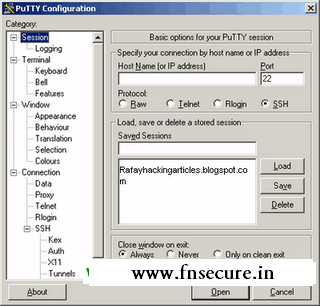
- Now download an open source SSH Client named Putty .
- After downloading ,execute the software and run it.
- Now you will come to this configuration settings page.
- Now in the host name,enter the server through which we can connect SSH access.make sure SSH is selected using port 22.
- Next, in the SSH options,click on Tunnels,here we will set up a Tunnel.
- Change the Source port to 8080 and then click on Dynamic.
- After doing all this click on Open.
- Now login in with username and password which we given in SSH Provider.
- Establishing the tunnel part is completed now.
Wire Shark Instalation

- Now we need to Download another software named Wire Shark and execute wireshark.
- Now start Packet capture,in the beginning it will be empty.
- Open google.com in your browser and then packets getting captured by the software.
Configuring Mozilla

- Open the Mozilla browser and open "Tools" menu and then "Options".
- Click on "Advanced" button tab, and then "Network" tab, and then click on "Settings".

- Now you are in Connection Settings enter "localhost" as the "Socks Host and port number, such as "1080" into the "Port:" field.
- Now come back to wire shark you will see some SSH connection but now there's no information about what is being sent from server to client.


Save this Page
